

About entire-brain
entire-brain is a memory layer for your Git repository. It brings together saved agent sessions, checkpoints, project memories, documentation, and code context from entire-graph. entire-graph maps how your code connects while entire-brain adds the context behind it: why a decision was made, what was tried before, and what your team learned. That memory belongs to the project and different coding agents can use it. For example, you can move from Claude Code to Codex and give the next agent context from earlier work.Context for Your Next Task
Brain gives a new agent session access to your project’s recorded decisions, rules, and lessons. Use that context when you return to a task or switch agents. For example, ask Brain for earlier decisions about retries before changing how failed requests are retried. Your agent can check those decisions before editing the code.Use Brain in Your Project
- Understand a project to get an overview of its structure and how it works.
- Prepare for a task and find relevant decisions, code locations, and possible tests.
- Find earlier work by searching through saved memories, history, and documentation, including PDF, Word, Excel, and PowerPoint files under
docs/. - Record a project rule or decision for future sessions, or a global memory that applies in every repository.
- Browse what entire-brain knows in a local UI.
- Sync memories with your hosted Entire repository when you choose to connect it.
Before You Start
Use a local Git repository with at least one commit. Install the Entire CLI and Git 2.36 or later. To give entire-brain access to future agent sessions, enable Entire in your repository. entire-brain can also work from code, docs, and Git history when no saved sessions are available. Make sure to commit your intended changes before setup.Install entire-brain
Install the released plugin:--yes for an unattended
installation. Use --no-deps only when you manage dependencies separately.
See the plugin reference for installation options.
On macOS and Linux, you can also install the Brain binary with the script:
Read Upgrade and Recover before updating an existing
installation. Local migration is one-way. v0.5.1 removes verified
legacy copies automatically; no migration or cleanup command is required.
Set Up Your Repository
Open the project repository where you want to use entire-brain. If you installed entire-brain from source, switch from theentire-brain source directory to your project first.
From your project’s root, run:
--verbose to see the full report for each phase.
Setup asks before it extracts memories from past sessions, and the default answer is no. Memory extraction uses an available coding agent, can send session content to its model provider, and can add token charges. When setup runs without a terminal, for example in a script, it skips extraction unless you pass
--yes.Setup remembers what you decline, so rerunning it does not ask again. To turn a declined step back on, pass --backfill for memory extraction, --daemon for the background watcher, or --agent-hooks for Claude Code hooks.To skip memory extraction and the background watcher entirely, use entire brain setup --no-backfill --no-daemon.Agent Instructions
Setup regenerates.entire/agent-guide.md completely. Manual edits to that file
are lost. In AGENTS.md and CLAUDE.md, setup updates the managed reference
blocks and preserves your surrounding text.
To preview the instructions without changing any files, run
entire brain agent-guide.
Review and commit the generated files to share the instructions with your team. Restart your agent or reload its repository instructions so it picks up the guide.
The guide includes instructions for each product you have set up. The default setup includes both products, so also run entire graph setup to add the entire-graph instructions. You can run the two setups in either order.
Use Brain from Your Agent
Agents use the CLI commands in.entire/agent-guide.md. Restart the agent after
setup so it loads the updated instructions. For a new task, start with a brief:
entire brain recall for recorded decisions and entire graph to inspect
current code. Brain v0.5.1 does not provide the entire brain mcp command or its
previously documented HTTP listener. Use the CLI integration for this release.
How to Use entire-brain
Use entire-brain from the CLI or UI after setup, or use the agent prompt to have your agent set it up for you.A coding agent using entire-brain memories while it works.
- CLI
- UI
- Agent Prompt
Run these commands from your repository.Get a project overview:Get context for a task:Search earlier decisions:Save a memory, then find it again. Replace the example with a rule that is true for your project:Check whether memory is current:If something needs attention,
entire brain doctor reports the problem and the command that fixes it.See the command reference for more options. To list every command, including developer commands hidden from the default help, run entire brain --help-all.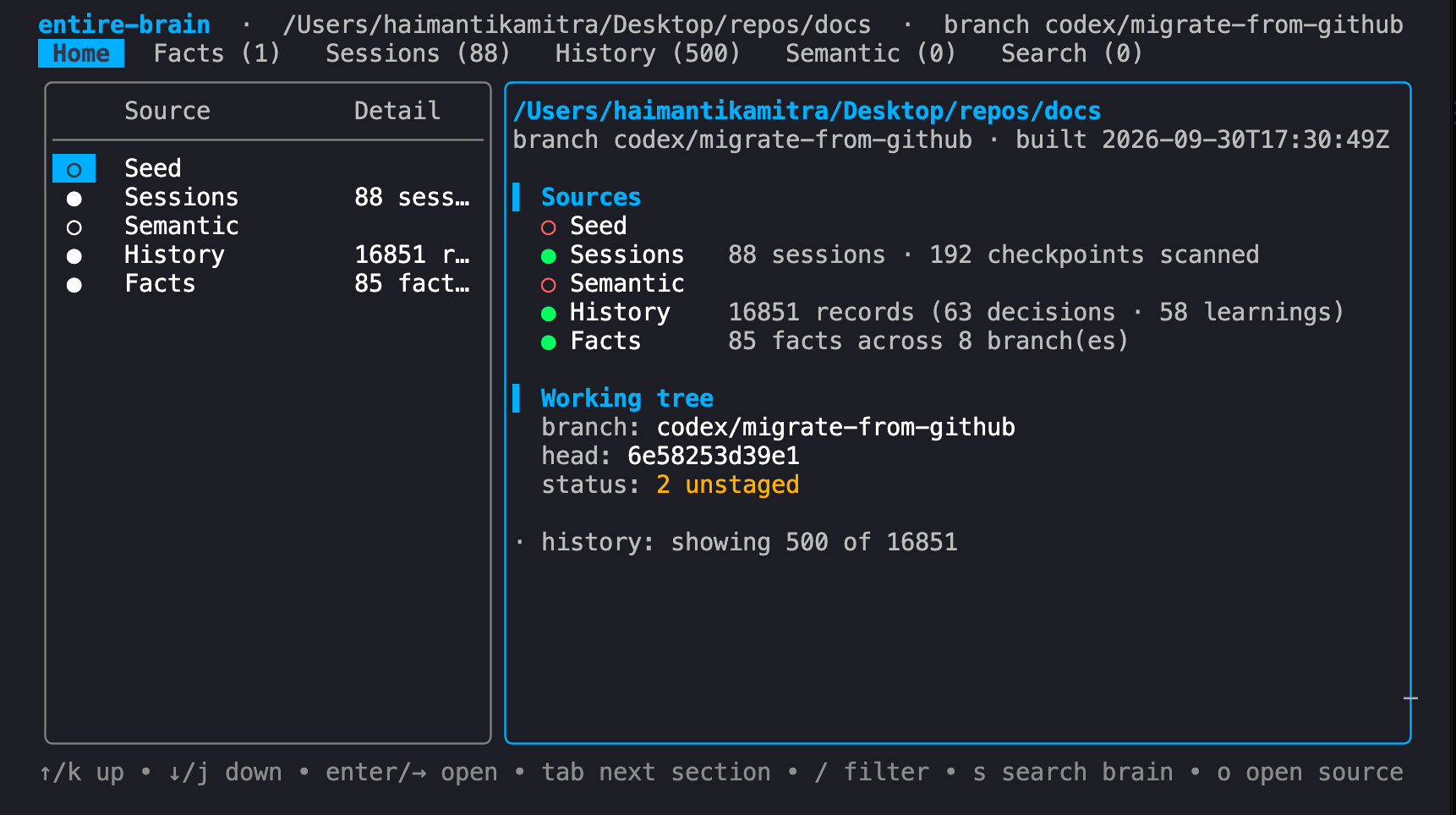
Pause Background Work
The background watcher and the session-end hook keep memory current and can call a coding agent to extract memories. To pause all background entire-brain work on your machine, run:entire brain setup --uninstall-daemon.
Sync Memories with Entire
Memories shown on a Trail in entire.com.
connect records the hosted repository and attempts a sync immediately.
After connection, Brain can sync when memory extraction finishes, when you commit
or push, and during background maintenance. You do not need to run a sync command
after each change.
To stop syncing, run:
entire brain memories sync. Without a connection,
a plain sync fails and tells you to run connect. Scripts can also provide an
explicit hosted target.
See Storage and Sync for memory scope, explicit
targets, network controls, and background writer behavior.